Überblick
Ein Partner mit Gesicht und Stimme
KIKI steht für Kernel-level Intelligent Knowledge Integrator. Sie ist die Tech-Lead-Assistentin von JGREATER und lebt auf dem Rechner von Johann und auf seinem Handy. Kein einzelnes Chatfenster: Gespräch, Code, Browser und Rückmeldung gehören zusammen. Diese Seite erklärt den Aufbau. Das Gespräch daneben ist die öffentliche Demo.
Gesicht und Stimme
Sie hört zu und antwortet. TalkingHead ist die Figur. Real ist das neue, künftige Gesicht und wird laufend verbessert. Beides geht mit der Stimme mit.
Zwei Gehirne
Der Chat führt das Gespräch. Cursor schreibt und ändert Code. Eine gemischte Aufgabe wird aufgeteilt, beide Seiten arbeiten parallel.
Handy
Vom Telefon aus wird der Laptop gesteuert. Wenn etwas erledigt ist, kommt die Meldung „Fertig“ zurück.
Aufbau
So ist es aufgesetzt
Oben das Handy. Darunter der Chat mit Stimme, Gesicht, Gesten und der Rückmeldung. Daneben zwei Arbeiter: Cursor für den Code, OpenClaw für Browser, Mail und das Web. Ein Conductor schaut auf die Aufgabe und teilt sie auf. Die Bilder stammen aus KIKI Ops, der Übersicht auf dem Rechner.
| Schicht | Aufgabe |
|---|
| Handy | Schreiben, sprechen, den Laptop steuern, „Fertig“ lesen. |
| KIKI Chat | Gespräch, Stimme, Gesicht, Gesten, Benachrichtigung ans Handy. |
| Cursor | Schweres Coden, Umbau, Fehler, die Projekte auf dem Rechner. |
| OpenClaw | Browser, Mail, Webseiten, laufende Sitzungen. |
| Conductor | Teilt eine gemischte Aufgabe auf Chat und Cursor. |
| Gesten | Laptop-Kamera: Hände und Mimik. Die Handykamera bleibt außen vor. |
| Presence | TalkingHead oder Real, das künftige Gesicht. Stimmung und Lippen zur Stimme. |
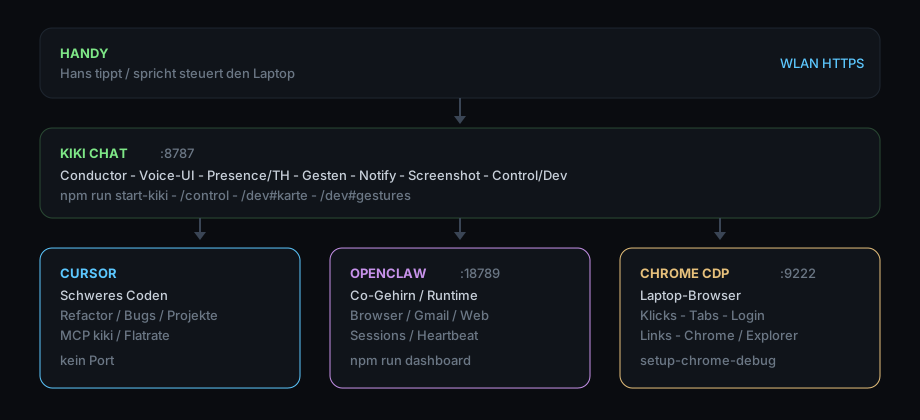 Dieselbe Schichtung als Plan: wer über wem sitzt.
Am Rechner
Was KIKI am Rechner kann
Am Rechner führt sie die Arbeit. Sie steuert die Cursor-Agenten und OpenClaw, nimmt Apps und Projekte in die Hand und bleibt an einer Aufgabe, bis sie fertig ist.
Gespräch
Schreiben und sprechen. Die Antwort kommt als Text und, wenn gewünscht, als Stimme. Das Gesicht geht mit.
Cursor-Agenten
Sie startet die Agenten in Cursor, bleibt im Gespräch und diskutiert mit, bis Code, App oder Projekt steht. Rückfragen gehen in denselben Lauf.
Bildschirm
Sie kann den Desktop sehen und einen Ausschnitt ans Handy schicken, damit klar ist, worum es geht.
OpenClaw
Sie steuert OpenClaw mit dessen Fähigkeiten: Browser, Mail, Webseiten und laufende Sitzungen. Was OpenClaw kann, stößt sie an und begleitet es.
Projekte und Apps
Anwendungen und Projekte anlegen, umbauen und prüfen. Der Chat führt, die Agenten setzen um.
Gesten
Die Laptop-Kamera liest Hände und Mimik. Ein Wink oder ein Blick kann die Presence steuern. Das Handy filmt dafür nicht.
So arbeitet sie
Drei Ebenen desselben Arbeitsplatzes: die Aufgabe führen, bei Cursor bleiben, OpenClaw steuern.
Aufgabe führen
Eine Aufgabe kommt im Chat oder vom Handy. KIKI hält den Faden, teilt die Arbeit auf Cursor und OpenClaw und meldet, wenn ein Stück fertig ist.
Bei Cursor bleiben
Sie bleibt bei den Cursor-Agenten, liest mit, fragt nach und diskutiert, bis es fertig ist. Nicht ein Auftrag und weg, sondern dasselbe Gespräch bis zum Ende.
OpenClaw führen
Browser, Mail, Web und laufende Sitzungen gehören zu OpenClaw. KIKI steuert diese Fähigkeiten und hält sie an derselben Aufgabe.
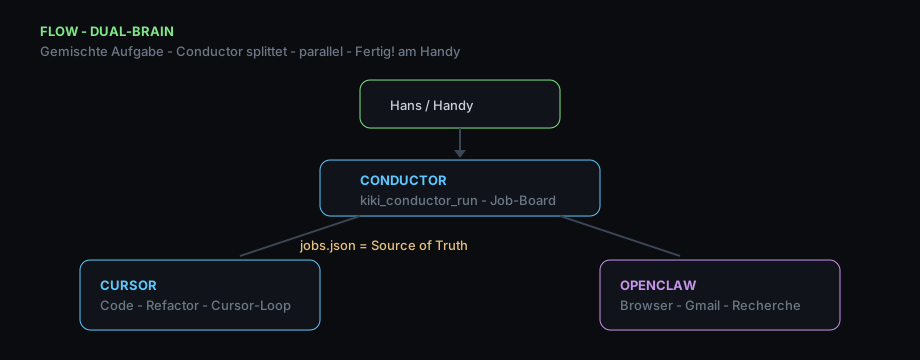 Dual-Brain: eine Aufgabe wird geteilt, parallel erledigt, das Handy bekommt Fertig.
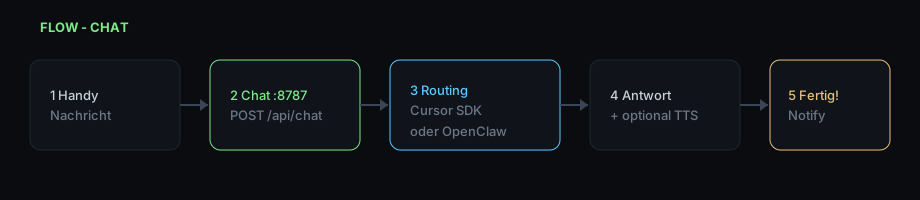 Chat: Nachricht rein, Antwort, Stimme.
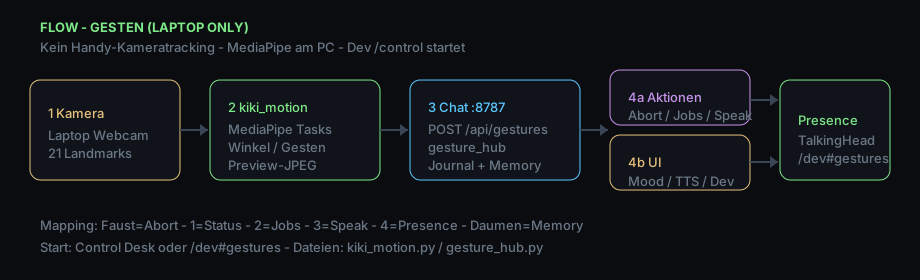 Gesten bleiben an der Laptop-Kamera und wirken auf Gesicht und Stimmung.
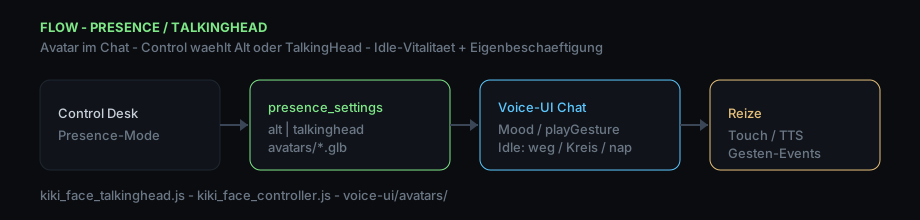 Presence: Figur oder Real, das künftige Gesicht. Stimmung, Lippen zur Stimme.
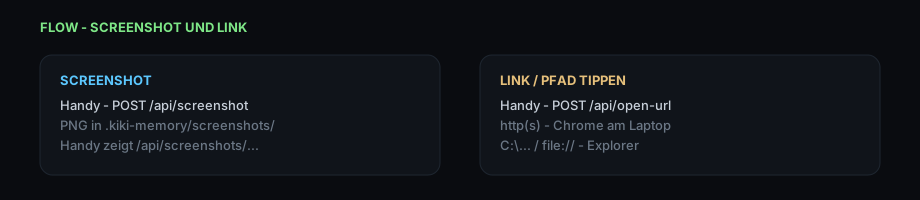 Bildschirmfoto und Link gehen vom Rechner ans Handy.
Diese Demo
Was Sie hier tun können
Die Demo ist das Gespräch der Firmenseite. Sie läuft für sich: keine Verbindung zu Johanns Rechner, keine Agenten, kein Zugriff auf Dateien oder Mail.
Hier
Schreiben und sprechen. Stimme aus Österreich, Deutsch oder Englisch, die Sprache folgt mit. Audio aus lässt den Text stehen, das Gesicht bewegt sich weiter. Bei TalkingHead gibt es Haarfarbe und Gewand. Real ist das neue Gesicht und wird laufend verbessert. Lieder kommen aus dem Katalog.
Nicht hier
Kein Blick auf den Bildschirm, keine Mail, kein Code, kein Browser. Sie sind nicht Johann. Wenn von ihm die Rede ist, bleibt er in der dritten Person.
Overview
A partner with a face and a voice
KIKI stands for Kernel-level Intelligent Knowledge Integrator. She is the tech-lead assistant at JGREATER and lives on Johann’s computer and on his phone. Not a single chat window: conversation, code, browser, and the done message belong together. This page explains the setup. The conversation beside it is the public demo.
Face and voice
She listens and answers. TalkingHead is the figure. Real is the new face going forward, and it keeps getting better. Both move with the voice.
Two brains
Chat holds the conversation. Cursor writes and changes code. A mixed task is split, and both sides work in parallel.
Phone
The phone steers the laptop. When something is done, a done message comes back.
Setup
How it is put together
The phone sits on top. Under it, chat with voice, face, gestures, and the reply to the phone. Beside that, two workers: Cursor for code, OpenClaw for the browser, mail, and the web. A conductor looks at the task and splits it. The pictures are the KIKI Ops map on the computer.
| Layer | Job |
|---|
| Phone | Write, speak, steer the laptop, read the done message. |
| KIKI Chat | Conversation, voice, face, gestures, notice to the phone. |
| Cursor | Heavy coding, refactors, bugs, the projects on the computer. |
| OpenClaw | Browser, mail, web pages, running sessions. |
| Conductor | Splits a mixed task between chat and Cursor. |
| Gestures | Laptop camera: hands and expression. The phone camera stays out. |
| Presence | TalkingHead or Real, the face going forward. Mood and lips with the voice. |
The same stack as a plan: who sits above whom.
On the computer
What KIKI can do on the computer
On the computer she runs the work. She steers the Cursor agents and OpenClaw, takes apps and projects in hand, and stays with a task until it is finished.
Conversation
Write and speak. The reply comes as text and, when wanted, as voice. The face follows.
Cursor agents
She starts the agents in Cursor, stays in the conversation, and talks it through until the code, the app, or the project stands. Follow-up questions go back into the same run.
Screen
She can see the desktop and send a crop to the phone, so it is clear what the task is about.
OpenClaw
She steers OpenClaw with its own abilities: browser, mail, web pages, and running sessions. What OpenClaw can do, she starts and stays with.
Projects and apps
Create, change, and check applications and projects. Chat leads, the agents carry it out.
Gestures
The laptop camera reads hands and expression. A wave or a look can steer presence. The phone does not film for that.
How she works
Three layers of the same workplace: lead the task, stay with Cursor, steer OpenClaw.
Lead the task
A task arrives in chat or from the phone. KIKI keeps the thread, splits the work between Cursor and OpenClaw, and reports when a piece is done.
Stay with Cursor
She stays with the Cursor agents, reads along, asks, and talks it through until it is finished. Not one order and gone: the same conversation until the end.
Steer OpenClaw
Browser, mail, the web, and running sessions belong to OpenClaw. KIKI steers those abilities and keeps them on the same task.
Dual brain: a task is split, done in parallel, and the phone gets a done message.
Chat: message in, reply, voice.
Gestures stay on the laptop camera and affect face and mood.
Presence: figure or Real, the face going forward. Mood, lips with the voice.
A screenshot and a link go from the computer to the phone.
This demo
What you can do here
The demo is the conversation on the company site. It runs on its own: no link to Johann’s computer, no agents, no access to files or mail.
Here
Write and speak. A voice from Austria, German, or English, and the language follows. Audio off keeps the text, the face keeps moving. TalkingHead has hair color and outfit. Real is the new face and keeps improving. Songs come from the catalog.
Not here
No view of the screen, no mail, no code, no browser. You are not Johann. When the page talks about him, he stays in the third person.